
Redaction Check
Finds failed redactions in PDFs: text still present under black boxes or dark annotations, redaction marks never applied, and terms that should not appear anywhere in the file.
A black box drawn over text hides it on screen, but the text is often still in the PDF: it can be selected, copied, searched and extracted. This tool reads each PDF and reports dark or invisible text whose centre sits under a dark filled shape, text under a dark comment-style annotation (a box, highlight, ink or similar, which can simply be moved or deleted), and redaction marks that were placed but never applied.
Optionally, give it a list of terms that must not appear (names, account numbers and so on). Each is searched for, ignoring case, in the page text, comments, the document properties, the XMP metadata and the bookmarks.
Light text on a dark background is visible by design and is ignored. Scanned pages have no text, so redactions on them cannot be checked this way; such pages are listed so you can look at them.
Use it when
- Before producing redacted documents, as a final check that every redaction actually removed the text.
- When redactions were made by drawing black boxes or black highlighting (for example in Word, then saved as PDF) rather than with a redaction tool.
- When you have received a production and want to know whether its redactions can be lifted.
- When certain names or numbers must not appear anywhere in a production, including its metadata.
How to run it
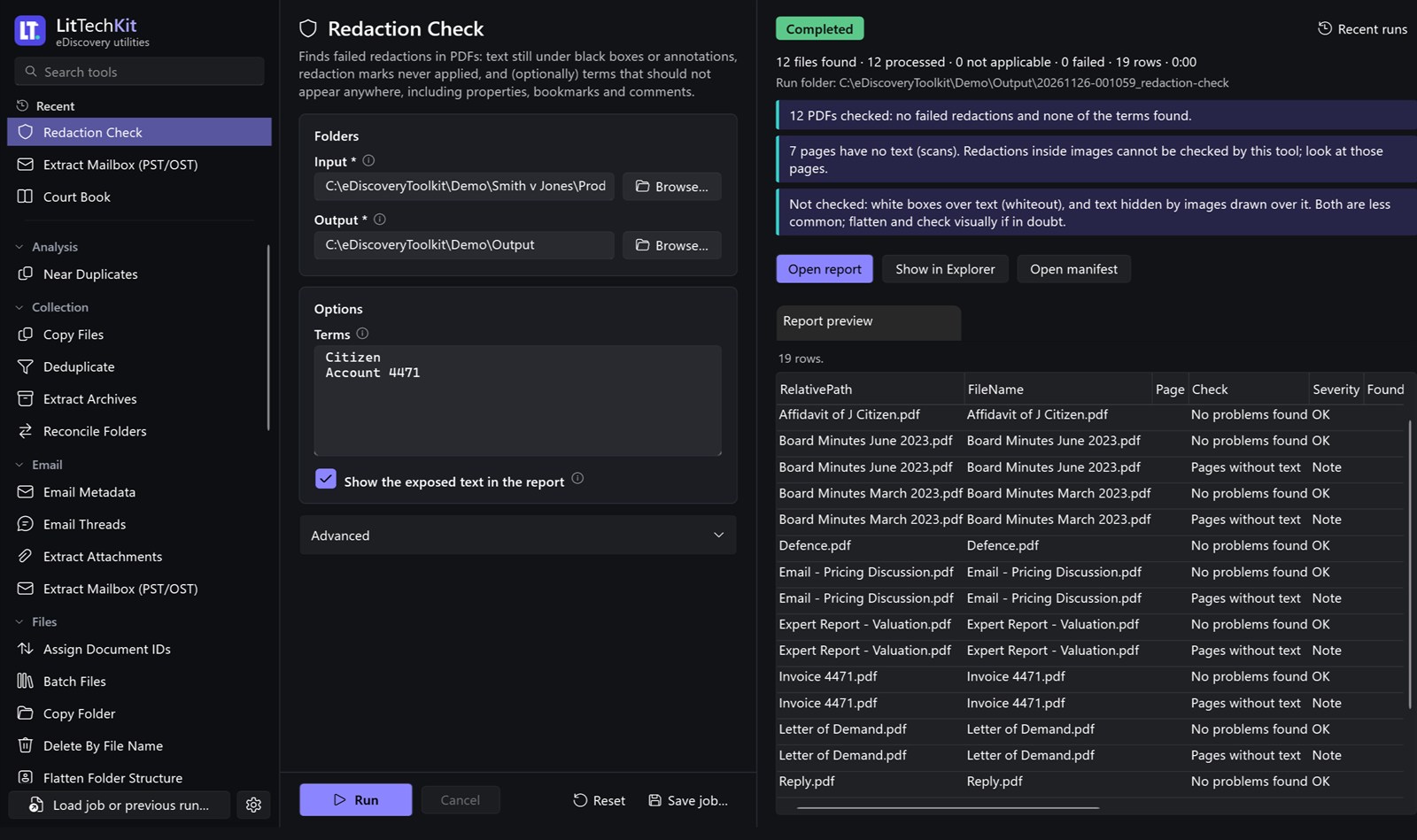
- Choose the folder of redacted PDFs (or a single PDF) as Input.
- Choose an Output folder.
- Optionally, type the Terms that must not appear, one per line.
- Decide whether to Show the exposed text in the report; turn it off if the report will be shared.
- Click Run, read the notes, then Open report.
Settings
Every setting has the same help beside it in the app. On the command line, pass each as --name value; ltk help redaction-check lists them.
Settings
| Setting | What it does | Type and default |
|---|---|---|
Terms--terms |
Words or phrases that must not appear anywhere, one per line (names, account numbers…). Each is searched for, ignoring case, in the text of every page, the document properties, bookmarks and comments. Empty: only the box and annotation checks run. One word or phrase per line. A phrase matches even if the words are separated by line breaks or extra spaces. Leave it empty to run only the box and annotation checks. |
text (lines) empty |
Show the exposed text in the report--show-text |
Put the text found under redaction boxes (and around each term found) in the report, so it can be checked. Off: the report gives only the page and position; use this when the report itself will be shared. On, the Found column shows the text found under each box, and about 40 characters either side of each term found, so you can see what is exposed. Off, Found is left empty and the report gives only the page, the check and the position; use this when the report itself will go to the other side, a client or the court. |
yes/notrue |
Common settings
| Setting | What it does | Type and default |
|---|---|---|
Input required--input |
Folder (or single file) to read. It is opened read-only and never modified. | folder empty |
Output required--output |
Folder for reports. Must not be inside the input folder. Each run gets its own sub-folder. | folder empty |
Recurse--recurse |
Include sub-folders. | yes/notrue |
Extensions--extensions |
Only process these extensions (e.g. .pdf, .docx). Empty means the tool's default set. | list empty |
Parallelism--parallelism |
Files processed at once. Use 1-2 for spinning disks or network shares. | number4 |
What you get
Each run creates its own folder inside the output folder, with the report redaction-check.csv, errors.csv and manifest.json (see Run folders and manifests).
redaction-check.csv: One row per problem, plus one "No problems found" row for each clean PDF. Page and Location (position in points) say where; Check is Text under a box, Text under an annotation, Redaction not applied, Term found or Pages without text; Severity is Error, OK or Note; Found is the exposed text (when shown); Detail explains it.
Report columns
RelativePathFileNamePageCheckSeverityFoundLocationDetailSourcePath
Check the result
- Read the notes: they say how many PDFs were checked and how many have problems. Do not produce a PDF with an Error row until it is fixed.
- Filter the report on Severity = Error and look at each page listed.
- Look at every PDF with a "Pages without text" note by eye: a redaction inside a scanned image cannot be checked by this tool.
- After fixing, run the check again on the corrected files.
- "Redaction not applied" means the area was marked for redaction in a PDF editor but the redactions were never applied. Apply them in that editor and save again.
- "Text under an annotation" is a comment, not a redaction: anyone can move or delete it. Redact that text properly with a redaction tool and check again.
- Encrypted PDFs cannot be checked; remove the password first with Decryption.
- With Show the exposed text in the report on, the report contains the very text that was meant to be redacted. Treat it as confidential, or run again with the option off before sharing it.
- Not checked: white boxes over text (whiteout) and text hidden by an image drawn over it. If in doubt, flatten the PDF and check it visually.
- A clean result means no hidden text was found under dark shapes or annotations. It does not prove the right things were redacted.
From the command line
The command line is part of LitTechKit Pro. See Command line.
ltk run redaction-check --input "D:\Matter\Production\Redacted" --output "D:\Matter\QC" --terms "Jane Citizen" --show-text falseRelated tools
- Flatten PDFs: Bakes form fields, comments and other annotations into the page so they can no longer be edited, hidden or deleted, writing flattened copies. Links are kept unless you choose otherwise. Annotations with nothing to draw, or not shown on screen, are left and reported. Comment text that is not shown on the page is saved to comments.csv.
- Decryption: Removes known passwords from PDF, Word, Excel and PowerPoint files, writing unlocked copies and reporting which password number opened each file (the passwords themselves are never saved). Encrypted .docx/.xlsx/.pptx files are decrypted without Office, so the unlocked copy is the original document exactly.
- Keyword Search: Searches PDF, Word, Excel, PowerPoint, email and text files for keywords (with wildcards) or regular expressions. Reports every hit with context, hits per term, and files that could not be searched.
- OCR (Searchable PDFs): Makes scanned PDFs and images (TIFF, JPEG, PNG) searchable with Windows' built-in OCR: an invisible text layer is added over each scanned page, so it looks the same but can be searched, selected and extracted. Pages that already have text are left alone. Images become PDFs. Works offline.